e-Invoicing
 Security and Navigation
BEFORE YOU BEGIN This feature may be hidden in your Autotask instance because it is not activated. If so, you can activate it on the Left Navigation Menu > Admin > Admin Categories > Activations page. Refer to Activations.
PERMISSIONS Security level with the Finance, Accounting, & Invoicing Admin setting enabled.
NAVIGATION Left Navigation Menu > Admin > Features & Settings > Finance, Accounting, & Invoicing > e-Invoicing
Overview
E-invoicing in Autotask enables organizations to generate and send electronic invoices that comply with the European Union’s VAT in the Digital Age (ViDA) directive. This feature ensures invoices are machine-readable and routed through centralized networks, such as PEPPOL, to meet evolving regulatory requirements across EU member states. E-invoicing streamlines invoice delivery, improves traceability, and supports faster payment cycles.
IMPORTANT Enable e-invoicing only when Autotask is the authoritative invoicing system. If your environment uses an integrated financial platform for invoice management, delegate e-invoice generation to that system to maintain data integrity. Do not activate e-invoicing if invoice numbers are modified or reassigned outside Autotask after initial creation, as this can introduce discrepancies between systems.
Key benefits
-
Ensures compliance with EU e-invoicing mandates
-
Reduces manual errors and administrative overhead
-
Enhances invoice traceability and transparency
-
Supports automated, cross-border invoice routing
Why e-Invoicing is needed?
-
Regulatory Compliance: The EU ViDA directive requires all invoices to be electronic, machine-readable, and routed through approved networks. Each EU country has its own timeline, with full compliance required by 2030.
-
Operational Efficiency: E-invoicing automates invoice delivery, reduces manual processing, and accelerates payment cycles.
-
Market Readiness: Autotask prioritizes support for countries based on their regulatory start dates, ensuring users are ready for compliance as mandates take effect.
e-Invoice Processing
When e-invoicing is enabled, all invoices for organizations with e-invoicing enabled will be automatically submitted to the routing agent.
The Invoice History page will display the status of each e-invoice and allow for download or resubmission if needed.
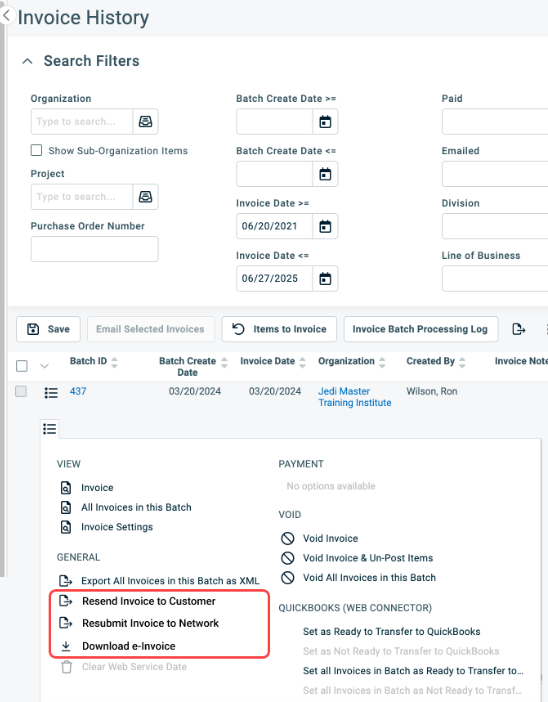
Prerequisites
| Requirement | Where to configure in Autotask |
|---|---|
| Tax/VAT ID |
CRM Account Tax ID field (receiving party); Admin/System Tax ID (sending party). NOTE The Tax ID fields for both the receiving and sending parties must use letters and numbers only—no symbols are allowed. |
| Legal ID | CRM Account > Invoice Settings > E-invoicing: Legal ID (receiving party); Admin > E-invoicing: Legal ID (sending party) |
| Destination Country | CRM Account > Invoice Settings > Billing Address |
| Fallback Email Address | Main Billing Contact by default; can be customized per customer |
| Requires Government Invoice | CRM Account > Invoice Settings > E-invoicing |
| Sender | The organization sending the invoices. |
| Sender Address | Your internal CRM account (Account 0) must have a complete address, including the country. |
| Receiver | The organization receiving the invoices. |
Refer to The Invoice settings tab and page for more information.
IMPORTANT All required fields must be populated for successful e-invoice submission. Missing information will result in rejection by the routing agent.
IMPORTANT Invoice grouping via the Invoice templates are not supported for e-invoicing for Tax/VAT reporting reasons. To ensure that the invoices are submitted correctly, all groupings must be disabled on the invoice templates. Refer to Configuring the invoice body.
e-Invoicing terminology
Electronic Invoice (e-invoice): The XML representation of an invoice based on the EN 16931 standard for structured invoice data.
Routing Network (Exchange Network): The Routing Network ensures that the submitted invoice is routed to the correct receiving party based on Tax/VAT ID or local Business Registration ID. In most countries the Routing Network is PEPPOL. Other Routing Networks exist and associate to specific countries. The initial release will support PEPPOL. Routing network examples are:
-
PEPPOL for most of EU.
-
DFN for Canada and US.
VAT reporting portals (Exchange Network): VAT reporting portals are based on the destination country and are Independent of the Routing Network. The Routing Agent will automatically submit to these portals where required by law. Examples are:
-
FINVoice for Finland, (requires manual submission)
-
SDI for Italy for VAT reporting
-
Verifact for Spain
Routing Agent: Invoices must be submitted to the appropriate routing networks based on the invoice’s source and destination countries. Autotask uses a third-party routing service to ensure that each generated invoice is delivered to the correct routing network and relevant tax authority. Routing agent services are considered third-party technology, as defined in the Kaseya Master Agreement.
TaxID / VATID: The Tax/VAT ID of an organization that uniquely identifies the organization. This ID is used for TAX reporting purposes. In Europe, most VAT IDs always start with a country code. Examples are:
-
Germany: DE123456789
-
Belgium: BE123456789
Legal ID: A business registration ID that is unique to an organization. This ID may be required in addition to the Tax/VAT ID or be the same. Whether this ID is required is determined by the local government. Example ID names are:
-
Belgium: EN
-
Italy: IVA
-
France: SIREN
What countries require a legal ID?
NOTE If the Is Legal ID required column indicates “Yes,” all sending and receiving companies within that country must provide a legal ID.
| Country code | Destination country | Destination type | Is VAT ID required | Is Legal ID required | Notes |
|---|---|---|---|---|---|
| CH | Switzerland | B2B, B2G | Yes | Yes | Legal ID = CH:UIDB |
| IS | Iceland | B2B, B2G | Yes | Yes |
Legal ID = IS:KTNR |
| LI | Liechtenstein | B2B, B2G | Yes | No | |
| NO | Norway | B2B, B2G | Yes | Yes | Legal ID = NO:ORG |
| AD | Anodra | B2B, B2G | Yes | No | |
| AL | Albania | B2B, B2G | Yes | No | |
| AT | Austria | B2G | No | Yes | Legal ID = AT:GOV |
| AT | Austria | B2B | Yes | No | |
| BA | Bosnia and Herzegovina | B2B, B2G | Yes | No | |
| BE | Belgium | B2B, B2G | Yes | Yes | Legal ID = BE:EN |
| BG | Bulgaria | B2B, B2G | Yes | No | |
| CY | Cyprus | B2B, B2G | Yes | No | |
| CZ | Czech Republic | B2B, B2G | Yes | No | |
| DE | Germany | B2G | No | Yes | Legal ID = DE:LWID |
| DE | Germany | B2B | Yes | No | |
| DK | Denmark | B2B, B2G | Yes | Yes |
Legal ID = DK:DIGST VAT ID = DK:ERST |
| EE | Estonia | B2B, B2G | Yes | No | |
| ES | Spain | B2B | Yes | Yes |
Legal ID = ES:FACE (Not supported until September 1, 2026) |
| FR | France | B2G | No | Yes |
Legal ID = FR:SIRET (Not supported until September 1, 2026) |
| FR | France | B2B | Yes | Yes |
Legal ID = FR:SIRENE or FR:SIRET (Not supported until September 1, 2026) |
| GR | Greece | B2B, B2G | Yes | No | |
| HR | Croatia | B2B, B2G | Yes | No | |
| HU | Hungary | B2B, B2G | Yes | No | |
| IE | Ireland | B2B, B2G | Yes | No | |
| IT | Italy | B2G | Yes | Yes |
Legal ID = IT:CUUO VAT ID = IT:IVA |
| IT | Italy | B2B | Yes | Yes |
Legal ID = IT:CUUO VAT ID = IT:IVA or IT:CF |
| IT | Italy | B2C | Yes | No | Email or IT:CF |
| LT | Lithuania | B2B, B2G | Yes | Yes | Legal ID = LI:LEC |
| LU | Luxembourg | B2B, B2G | Yes | No | |
| LV | Latvia | B2B, B2G | Yes | No | |
| MC | Monaco | B2B, B2G | Yes | No | |
| ME | Montenegro | B2B, B2G | Yes | No | |
| MK | North Macedonia | B2B, B2G | Yes | No | |
| MT | Malta | B2B, B2G | Yes | No | |
| NL | Netherlands | B2G | No | Yes | Legal ID = NL:OINO |
| NL | Netherlands | B2B | Yes | Yes | Leave blank unless a NL:KVK ID is provided and required. |
| PL | Poland | B2B, B2G | Yes | No | |
| PT | Portugal | B2B, B2G | Yes | No | |
| RO | Romania | B2B, B2G | Yes | No | |
| RS | Serbia | B2B, B2G | Yes | No | |
| SE | Sweden | B2B, B2G | Yes | Yes | Legal ID = SE:ORGNR |
| SI | Slovenia | B2B, B2G | Yes | No | |
| SK | Slovakia | B2B, B2G | Yes | No | |
| SM | San Marino | B2B, B2G | Yes | No | |
| TR | Türkiye (Turkey) | B2B, B2G | Yes | No | |
| VA | Vatican City | B2B, B2G | Yes | No |
Enabling e-Invoicing
Step 1: Enable e-Invoicing for your Autotask instance
The first step in the process is to enable e-Invoicing for your database.
-
Navigate to Left Navigation Menu > Admin > Admin Categories > Activations.
-
Select the check box for e-Invoicing.
-
Select Save.
-
Navigate to Left Navigation Menu > Admin > Features & Settings > Finance, Accounting, & Invoicing > e-Invoicing.
-
Toggle Enable e-Invoicing.
Step 2 : Confirm sender information
Ensure your organization’s Tax/VAT ID and, if required by local regulations, Legal ID are properly configured.
-
Navigate to Left Navigation Menu > Admin > Features & Settings > Finance, Accounting, & Invoicing > e-Invoicing
-
Verify the information listed is correct in the System Tax ID or Internal Organization Tax ID field, and if required, the Legal ID field.
Step 3: Prepare CRM organizations
Each customer organization that will require e-invoicing must be configured. Refer to The Invoice tab and settings page for more information.
-
Navigate to Left Navigation Menu > CRM > Search > Organizations > click Search > click an organization name > accessory tabs > Invoice Settings.
-
Enter the Tax ID and, if required, the Legal ID for organizations that will require e-invoicing.
-
Confirm the billing address and destination country.
-
Ensure a fallback email address is set.
NOTE Invoices will be sent by default to the Main Billing Contact. Refer to Main Billing Contact.
-
Indicate if a government invoice is required by selecting the Requires government invoice check box.
-
Use the CRM search page to identify organizations missing required information.
NOTE Bulk updates can be performed using the CRM Export/Import functionality. Refer to Importing or updating data.
Payment terms and due dates for e‑invoices
When E‑invoicing is enabled, Autotask includes the due date and payment terms in the electronic invoice. These values are derived from the Payment Terms associated with the invoice template used at the time of invoice generation.
How Autotask calculates the due date
Autotask uses the Payment Terms record linked to the invoice template to determine the e‑invoice due date.
-
The “Due in Days” setting is applied to the invoice date.
-
The calculated due date is then submitted in the e‑invoice XML to the routing network (for example, PEPPOL) and, where required, to tax/VAT authorities.
Examples
-
Due in 30 days
-
Invoice date: 1 March 2026
-
Due in Days: 30
-
E‑invoice due date: 31 March 2026
-
-
Due in 0 days (Due immediately)
-
Invoice date: 1 March 2026
-
Due in Days: 0
-
E‑invoice due date: 1 March 2026
-
NOTE “Due in 0 days” is treated as due immediately. In the e‑invoice, the due date equals the invoice date.
Payment means for e‑invoices
Payment means describe how the customer should pay the invoice (for example, bank transfer details). When e‑invoicing is enabled, Autotask can include your bank account and routing information in the e‑invoice XML.
What Payment Means Include
At invoice generation time, you can specify or adjust the following payment means values for inclusion in the e‑invoice:
-
Account Holder Name.
-
Account Number (IBAN).
-
Routing Number (BIC).
Disabling e-Invoicing
To disable e-invoicing at an organization level:
-
Navigate to Left Navigation Menu > CRM > Search > Organizations > search for the specific organization > open the organization > accessory tab > Invoice Settings.
-
Select the Disable e-Invoicing for this organization check box.
-
Select Save.
NOTE To update organizations in bulk, refer to Importing or updating data.
To disable e-invoicing globally for all organzations:
-
Navigate to Left Navigation Menu > Admin > Features & Settings > Finance, Accounting, & Invoicing > e-Invoicing
-
Toggle Enable e-Invoicing.
To disable e-invoicing for your entire Autotask database:
-
Navigate to Left Navigation Menu > Admin > Admin Categories > Activations.
-
Clear the check box for e-Invoicing check box.
-
Select Save.
e-Invoicing frequently asked questions
-
Which countries are included in Autotask’s e-invoicing support?
-
All EU countries are included, with support prioritized by each country’s legal mandate start date. The first wave includes Belgium, Germany, Estonia, Romania, Spain, Poland, France, Slovenia, and Latvia. All EU countries must be compliant by 2030.
-
-
What if my country does not have a mandated start date yet?
-
If your country is in the EU but does not have a mandated start date, you can request to have e-invoicing enabled. All EU countries will eventually be required to comply by 2030.
-
-
Are non-EU countries supported?
-
No, the initial release only supports EU countries. Support for other regions may be considered in the future.
-
-
What are the minimum requirements for an e-invoice?
-
Tax/VAT ID (with country code) for both sender and receiver
-
Legal ID (if required by local regulations)
-
Destination country (from billing address)
-
Fallback (contact) email address
-
Government invoice flag (if required)
-
Sender and receiver details
-
Complete receiver address
-
Complete address of your internal company (ID: 0)
-
-
What happens if an invoice submission fails?
-
If the invoice is missing required information, the Routing Agent will reject it. You must correct the data and resubmit via the Invoice History page. If the Routing Network submission fails, the invoice will be sent via fallback email automatically.
-
-
How is data processed and where is it stored?
-
Autotask uses a Routing Agent based in the Netherlands, with data centers located within the EU. Data and architecture reviews are ongoing to ensure compliance.
-
-
What are the country-specific requirements?
-
Germany: E-invoicing required for companies with annual income above €800,000 and as required by the receiver; all others by 2027-01-01.
-
Spain: Special B2G requirements (not in initial release); Verifactu submission required from 2026-01-01.
-
Romania: MSP must register with the local VAT agency; Legal ID must be stored in Autotask.
-
Italy, Poland, Estonia, France: The Routing Agent manages registration and submission to the VAT agency.
-
-
Can I disable e-invoicing for some organizations?
-
Yes, e-invoicing can be enabled or disabled per CRM organization. Bulk updates are supported via CRM Export/Import.
-
-
What is the fallback if network submission fails?
-
Invoices will be sent via email from the Routing Agent. This fallback cannot be disabled, as it is a regulatory requirement.
-
-
What is not supported?
-
Invoice grouping (Roll Up) via templates (must be disabled for e-invoicing). To ensure that the invoices are submitted correctly, all groupings (rollups) must be disabled on the invoice templates to ensure accurate and consistent invoice reporting. E-invoices need to show all taxable items for accurate tax reporting.
-
Voiding (credit) invoices and email-only options (planned for future releases).
-
Netherlands: Autotask does not support threshold-based reverse charge VAT calculations. In the Netherlands, the €10,000 reverse charge threshold applicable to certain high-risk goods, such as mobile phones and electronic devices, is generally assessed on a per-invoice basis. However, when a single supply is invoiced in stages, split across multiple quotes, or delivered as part of a long-term project, Dutch VAT regulations may require the transaction to be evaluated based on its overall economic substance rather than on individual invoices.
-
Germany: Currently, only senders with a valid Umsatzsteuer-Identifikationsnummer (USt-IdNr. / VAT ID) (e.g., DE123456789) are supported. Other identifiers, such as the Steuernummer, Handelsregisternummer (HRB), or Steuer-ID (IdNr.), cannot be used as the sender’s primary identification number. Senders without a USt-IdNr. cannot be processed and should use a finance tool for invoicing.
-
Upcoming updates and known issues
| Issue | Type | How to identify | The fix | Expected Release |
|---|---|---|---|---|
| Invoices fail due to rounding errors in tax calculations. | Bug | Your Autotask PDF invoice shows more than two decimals. | Rounding rules are applied based on EN16931 requirements. | Released |
| Update line item name to use the line item description | Improvement | Autotask correctly submits line item descriptions via the e-invoice. To reduce confusion and configuration differences by the receiving software, Autotask will also submit the description as the actual name. | Some receiving finance tools ignore the line item description and the description is not visible to the receive. | Released |
| Add support for payment terms and notes. | Improvement | Payment terms are not included in the e-invoice. | The payment terms linked to the invoice template will be included in the e-invoice. The setting Payment Due in Days will determine the due date of the e-invoice. Refer to Payment terms. | Released |
| Invoice line items with “Texts” as a unit price or total fail to process. | Bug | Your Autotask PDF invoice includes a line item with "Varies", "Covered by contract", or "Non-billable" as the unit price or line total. |
The line item uses the total price as the unit price with a quantity of one. If the line item is informational and not an actual invoice item, it will not be included in the XML. This includes "Covered by contract", Non-billable", "Show on invoice", and "Block hour consumptions". They will remain on the PDF version of the invoice. Line items that are reduced to €0.00 will be submitted as reduced billable items. |
Released |
| Prevent changes to rounding rules. | Improvement | Your Autotask PDF invoice shows more than two decimals. | When e-invoicing is enabled, rounding rules based on EN16931 apply. | Released |
| Corrections for purchase order numbers. | Improvement | Purchase order numbers are not appearing on the e-invoice. | Purchase order numbers will be transmitted as an invoice purchase order. | Released |
| Add the Autotask PDF to the e-invoice as an attachment. | Improvement | The Autotask PDF is not included in the e-invoice. | Users will have the option to include or not include the PDF invoice at processing. |
Released |
| Add payment means to the admin configuration. | Improvement | Bank routing information is defined at invoicing. | This is a follow up to the bank information update. Provide a dedicated admin page for managing banking information records. | TBD |
| Due date is not visible in PEPPOL. | Routing agent issue | The due date inclusion stopped working after the fix was released. | The due date is submitted by Autotask. The routing agent is investigating why it is stripped when submitted to PEPPOL. | Released |
| The payment conditions are unreadable | Routing agent issue | The payment term note is showing as "discount#days=30#percent=0" on the receiving side. | The term description is submitted by Autotask correctly. The routing agent is investigating why it is changed when submitted to PEPPOL. The shown text is a valid UBL3 standard. With the release of the PDF inclusion, the user will see the "Human readable" version in the included PDF and not the "machine" version in the XML. | Released |
| Display of the VAT ID in addtion to the required Routing and Legal ID. | Improvement | The Routing / Legal ID is shown on the PEPPOL invoice, but the VAT ID is stripped away when a legal ID is present. | Autotask will include the VAT ID as an additional optional variable that some system use for display purposes. | Released |
| GLN support | Improvement | Invoices with GLN do not route properly. | Add support GLN based Routing and sub-routing. | Released |
|
Spanish support |
Improvement | Spanish e-invoice support for September 1st 2026 activation. | Add support for FACe B2B, FACe B2G, and B2C invoices. This update includes the Spanish PDF stamping. | Released |
| Italian support | Improvement | Italian e-invoice support for September 1st 2026 activation. | Add support for Italian B2B, B2G, and B2C invoicing with CUUO (Codice Univoco Ufficio) support. | Released |
| French support | Improvement | French e-invoice support for September 1st 2027 activation. | Add support for French B2B, B2G, and B2C invoicing with F10 reporting support. | Q1 2027 |
| German support | Improvement | German e-invoice support for January 1st 2027 activation. | Add support for German B2B, B2G, and B2C invoicing | 2026.6 |
| Credit notes | Improvement | Credit notes is not a native function in Autotask. | Implement functionality to augment the voiding of e-invoices by introducing credit note invoices with automatic e-invoice creation. | Q1 2027 |
| Include service and delivery dates | Improvement | Invoice item delivery date or periods are not included. | As part of the German update, all invoice items will include the items delivery date, service date or service period. | 2026.6 |


